
Introduction:
The easiest part of agreement management is sending for signatures, but the hardest part is knowing real-time status. When dozens of documents are involved, teams miss tracking who has signed, who hasn’t, and when to follow up.
eSigns automated signature reminders simplify agreement tracking and make the process easier. Teams can set signing deadlines, schedule reminders, and add recipients’ email addresses to automate follow-ups while a document is still awaiting signatures.
eSigns is one of the best electronic signature apps for businesses. It makes everyone spend less time checking and chasing signatures. In this blog, you can explore how eSigns streamlines document tracking via automated signature reminders.
Why is Tracking Pending Agreements Difficult for Businesses?
A document that has been sent doesn’t mean that it has been signed. Most of the work happens in between, and it’s easy to lose track.
Here are the challenges business teams usually face:
Searching Email Threads
To find out what’s still unsigned, someone has to dig through sent messages and replies.
Chasing Signers One by One
Many agreements have multiple signers, and each person may need a separate nudge.
Signature Requests Get Buried
People often mean to sign, then the email slides down the inbox and they forget.
No Clear Visibility
With many agreements open at once, it’s hard to say which are waiting, which are done, and which are close to their deadline.
Late Follow-ups
Without a consistent follow-up process, teams may send signing reminders late or overlook them until the deadline has passed
This slows everyday work like new-hire paperwork, vendor agreements, customer contracts, and internal approvals. The signing itself isn’t the problem. The follow-up around it is challenging in a manual approach.
How Do eSigns Automated Signature Reminders Simplify Agreement Tracking?
Businesses can create, edit, share, sign, and store agreements in one connected platform via eSigns Electronic Document Management Software. It helps firms replace traditional follow-up with automation.
Hence, teams can send follow-up emails to signers while a document is still waiting to be signed through eSigns Automated Signature Reminders.
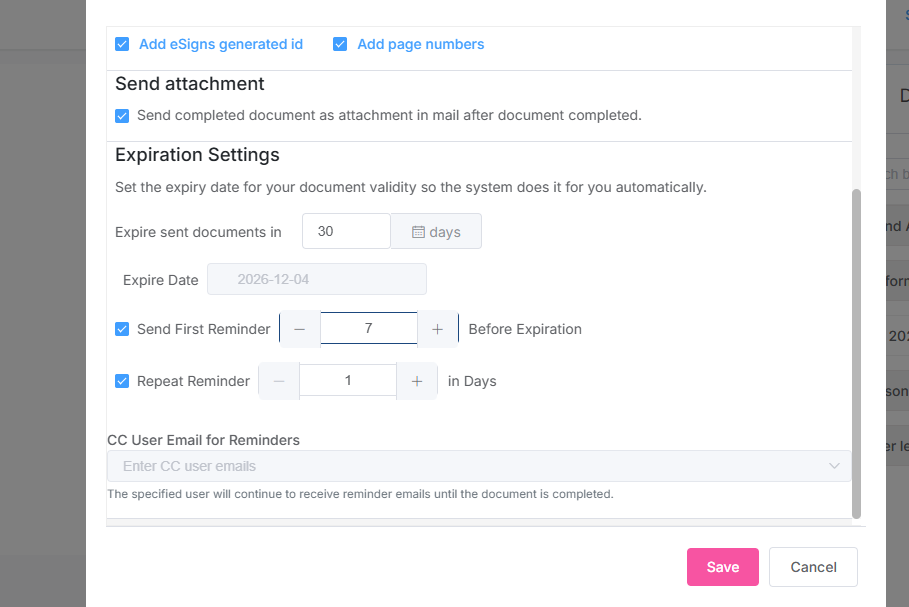
With eSigns, choose how long the document stays valid, when the first reminder goes out, and how often reminders repeat. No longer need to keep track of reminder dates by hand and can focus on agreements that need a closer look.
Set a Signing Deadline with an Expiration Date
Go to eSigns and choose how many days the agreement stays valid under expiration settings. It automatically calculates and sets the expiration date for you. Signers get a clear time limit, and you get a date to plan your reminders around.
For example, a company sending an employment agreement might make it valid for 30 days. That gives the new hire a firm deadline and gives HR a clear end date to work with.
Schedule First and Repeat Reminders
Next, you provide how many days before expiration the first reminder should go out. Then you choose how often the reminder should repeat in days.
Continuing with the previous example, i.e., take the same 30-day agreement. You could send the first reminder 5 days before it expires and repeat it every 1 day after that. These numbers are only an example. You can set your own timing based on the document and the people signing it.
Once this is set, nobody has to remember to send the next email. Signers keep getting reminders while the document is still open.
Add a Teammate to Follow Along
Sometimes the person who sends the document isn’t the only one who needs to know where it stands. You can add a teammate’s email address in the CC field for reminders. That person keeps receiving reminder emails until the document is completed.
Here’s how that might work for onboarding. An HR coordinator sends the paperwork; the HR manager is kept in CC for reminders. If the new hire hasn’t signed yet, the manager sees the reminders too and can step in without asking for an update.
Moreover, choose to have the completed document sent by email as an attachment via eSignature Software once everyone has signed.
How Does eSigns Help Track and Follow Up on Pending Agreements?
Reminders push people to sign documents without fail. Tracking the agreements lets you know what’s actually happening. Both keep agreements moving smoothly. eSigns offers both in the same platform.
1. Monitor Document Signing Status from One Dashboard
Using eSigns dynamic dashboard, you can track the status of each agreement signature, such as:
- Pending: The document is awaiting the required signatures.
- Signed: The signing process has been completed.
- Expired: The document has reached its expiration date without completion.
- Declined: A recipient has declined the signing request.
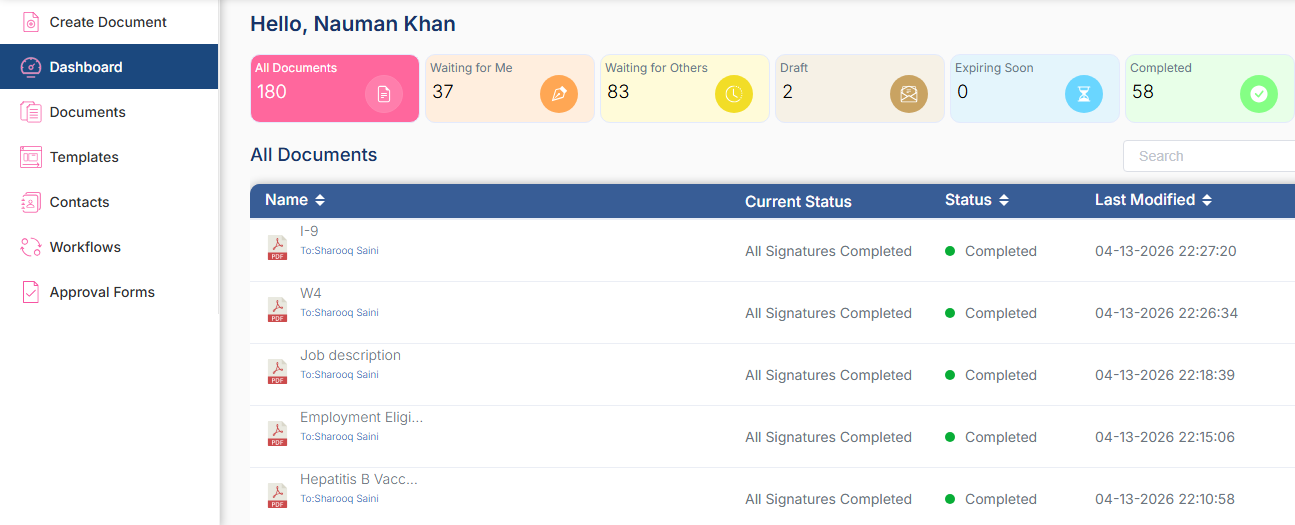
For operations, HR, and finance teams, this makes it easier to monitor ongoing signing requests and follow up where necessary.
This helps in a few practical ways:
- An operations manager can spot a vendor agreement that’s been sitting unsigned and follow up personally.
- A business owner can check on a customer contract without asking anyone for an update.
- A finance team can confirm an agreement is complete before processing payment.
For more understanding, just have a glance at the Use Cases of eSignature.
2. Configure Automated Reminders Before Documents Expire
With eSign’s expiration settings in documents and templates, users can set up reminders by defining the expiration date, first reminder count before expiration, total repeated reminders in days, and CC recipient emails for reminders.
As a result, business teams can eliminate handling manual follow-ups individually and send automated reminder emails consistently. Reminders handle the routine follow-up task. Tracking tells you when a document needs more than a reminder.
Keep Completed Agreements Easy to Find
Tracking doesn’t stop once a document is signed. You still need to find it later, sometimes months later.
eSigns stores signed and unsigned documents in a centralized repository, so your team can find required agreements in one place instead of searching through email attachments and shared folders.
That makes it easier to keep a central document repository for business agreements without extra filing work. eSigns also keeps an audit trail for each document. It records details such as timestamps, IP addresses, and authentication information, so you can check what happened and when.
For teams that manage multiple signing requests, this works like a magic tool to send, track, store, and look back on required agreements in no time.
Final Thoughts
Getting a document signed takes more than sending it. Someone has to follow up, watch the deadline, and make sure the finished copy is easy to find. If your team spends too much time asking “did they sign yet?”, it may be time to let the software do.
eSigns Automated Signature Reminders handle the follow-ups with an expiration date and scheduled reminders. Real-time agreement tracking, central storage, and audit trails cover the rest.
Explore eSigns Workflow Automation Software solutions by claiming your 30-day free trial and simplify how your team sends, tracks, and manages agreements effortlessly.
Frequently Asked Questions
1. What are automated signature reminders?
Automated signature reminders are emails that go out on their own to people who haven’t signed a document yet. They remove the manual process of writing and sending follow-ups one at a time.
2. How do automated eSignature reminders work?
You configure how long the document stays valid, when the first reminder should go out, and how often it should repeat through automated signature reminder settings powered by eSigns. Next, it will send reminder emails until the document is signed.
3. Can businesses track agreements waiting for signatures?
Yes. With eSigns real-time dashboard, businesses can track the status of their document signatures and see which ones still need attention.
4. Can businesses send reminders before an agreement expires?
Yes. Businesses can configure the first reminder to be sent a specified number of days before a document’s expiration date. They can also set repeat reminder intervals to follow up with recipients before the signing request expires.
5. How do signature reminders help reduce agreement delays?
Regular signature reminders bring the document back to their attention, and tracking helps you see which agreements are still open so you can follow up when needed and reduce agreement delays.