
Introduction:
Are you still printing & scanning contracts manually to share with other parties? It’s time to upgrade your business operations. In 2026, businesses stay competitive by replacing their manual operational processes with digital signing and automated workflows.
That’s how Electronic Signature Apps are booming in the market. The best Electronic Signature Software lets companies send, store, and sign documents online, eliminating the print, scan, and email cycle for good.
Modern eSignature platforms like eSigns.io, DocuSign, and others replaced pen-and-paper signatures with encrypted eSignatures and automated document workflows. However, choosing the best eSignature app transforms business workflows in 2026.
Let’s compare Electronic Signature vs Digital Signature, explore why firms are switching to eSignature apps, and the top 5 eSign apps worth considering in 2026.
Why Are Businesses Replacing Traditional Document Signing with Electronic Signature Apps?
With paper-based signing methods, a signed page can get lost between departments. An agreement can sit untouched in physical storage for days to weeks. However, the old-fashioned techniques often slow down business operations and productivity.
For businesses trying to cut manual admin work, the combination of digital signing and Workflow Automation isn’t just convenient; it’s evolving the standard. With an online document management system and digital signatures, business approvals automatically route to the right person.
That’s exactly why businesses are switching to electronic signature apps. Before jumping into the biggest transformation, companies should understand Paper-Driven Documents Vs Digital Documents, along with the key benefits of eSignature app brings.
As industries continue their digital transformation, modern document signing is becoming a core part of the future of document management
Key Features That Define a Modern Electronic Signature Solution
Not all free esignature software tools are designed equally. Here is what separates the strongest platforms from the rest.
Secure Digital Signing and Audit Trails
Modern digital signature software offers encrypted signatures with detailed audit trails, including timestamps and activity logs. Hence, every document remains secure and compliance-ready.
Workflow Automation
Advanced workflow automation tools automatically route documents, approvals, reminders, and notifications. Thus, free electronic signature software drives faster turnaround with less admin workload.
Centralized Document Storage
A central digital repository keeps every created and signed document organized, secure, and accessible whenever it is needed.
Mobile and Remote Accessibility
Business teams can review and sign contracts anytime, anywhere via PC, laptops, tablets, and smartphones. Also, collaborate with anyone remotely using No-Code Digital Signature Software.
API Software Integration
The best electronic signature apps, such as DocuSign, SignNow, and eSigns in 2026, support API integration with your existing HR, ERP, and CRM systems. As a result, document workflows run without manual switches.
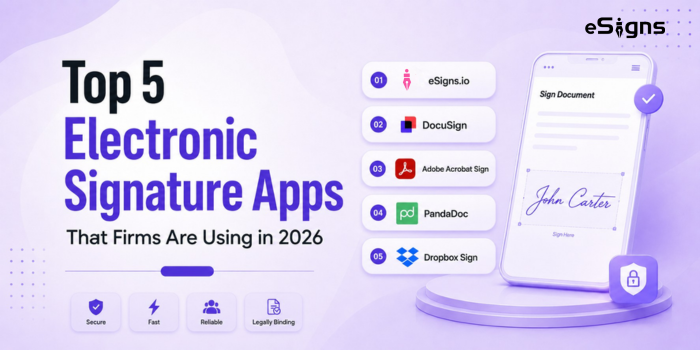
Top 5 Electronic Signature Apps That Firms Are Using in 2026
After exploring many electronic signature apps, we have curated the top 5 tools suited to different eSignature Use cases. Every eSign app in 2026 manages digital signing as a core job.
But the following best digital signature apps differ in workflow features, integrations, and costs. Check them below:
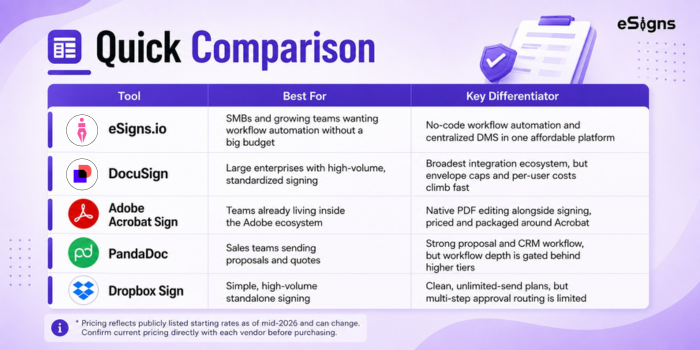
1. eSigns.io – Best Value for SMBs with Efficient Workflow Automation
eSigns is a budget-friendly, end-to-end platform designed for small and mid-sized businesses. It provides solutions such as secure electronic signatures, AI-powered document management, and no-code workflow automation in a single platform.
With the eSigns.io digital document management system, teams can draft, send, review, sign, and store documents from one centralized repository. Offers flexible pricing plans for startups, SMBs, and growing enterprises.
2. DocuSign – Best for Large Enterprise Electronic Signatures
DocuSign is one of the most reputed electronic signature software with an advanced eSign app, better integration, and enterprise-grade compliance. It is designed to manage a massive volume of contract signing across large enterprises.
DocuSign eSignature app supports advanced integrations but can’t manage complex business workflows at once. However, its pricing is better suited for large enterprises and less affordable for SMBs.
Companies looking for affordable eSign solutions with automated document workflows can read our eSigns vs DocuSign comparison guide.
3. Adobe Acrobat Sign – Best for PDF-based Workflows with Secure eSignatures
Adobe Acrobat Sign helps businesses sign documents digitally across iOS, Android, web browsers, and tracks signing activity offline with automatic syncing.
This eSignature app is strong for business teams that use Adobe products and handle PDF-based workflows. However, the Adobe Sign app is heavier and less cost-effective for organizations that require eSignature functionality.
4. PandaDoc – Best for Sales Proposals & Contract Automation
PandaDoc is another popular app that offers document creation, digital signing, and real-time status tracking in one place. PandaDoc is an ideal app for sales, marketing, consultants, and SaaS business teams signing proposals, quotations, and customer documents electronically.
Also, PandaDoc lets API integration with existing systems seamlessly and offers customizable pricing plans for businesses. However, entry-level or growing business teams need to upgrade and unlock the advanced tools.
5. Dropbox Sign: Best for Simple, High-Volume Standalone Signing
Dropbox Sign, formerly HelloSign, is built for teams that primarily need fast, no-frills signing. Paid plans include unlimited signature requests, and the interface is one of the easiest to onboard non-technical users onto.
Where it falls short is complex approval routing. Multi-step, conditional workflows, where a document must move through several departments in a specific order, are limited compared to platforms built for workflow automation, and template limits on lower tiers push growing teams toward custom-quoted plans sooner than expected.
Why Businesses Are Choosing eSigns.io for Document Management & eSignatures
eSigns goes beyond electronic signature software. Offered AI-assisted document management software solutions support businesses in streamlining workflows, accelerating approvals, and keeping data secure & encrypted.
Here is why companies across industries choose the eSigns electronic document management system:
-
- Reduce Administrative Work: Business teams can reduce printing, scanning, emailing, and document tracking efforts and focus more on results via the eSigns online document management system.
- Faster Turnaround Time: eSigns.io automates document workflows such as routing, approving, and reminders without delays, helping businesses close deals faster.
- Improved Customer Experience: With eSigns DMS, Customers and clients can sign from any device, with faster approvals and clearer communication throughout the process.
- Better Compliance and Security: Every business document activity, from creation to storage, undergoes detailed auditing and is managed efficiently through role-based access controls. eSigns secure eSignatures and real-time tracking make sure every document is tamper-proof and compliance-ready.
Conclusion:
Now, we have come to the end of the best electronic signature apps that transform business workflows in 2026. Honestly, no one particular app acts as the best eSign app in terms of all factors. Using a digital signature application to sign documents online every day should benefit other activities too.
Hence, choose the best electronic signature application that has easy-to-use navigation, strong integrations with existing apps, and automated workflow management in one platform. For SMBs and growing teams that want all three without enterprise pricing, eSigns.io is built specifically for that gap.
For more options, see our roundup of the 5 best DocuSign alternatives for small businesses.
FAQs
Q1. What is an electronic signature app?
An electronic signature app is a software platform that allows authorized users to securely sign, send, and manage documents digitally from their mobile devices using the application.
Q2. Are electronic signatures legally valid for business documents?
Yes, electronic signatures are legally valid for business documents when they comply with local laws and standard compliance regulations.
Q3. Can electronic signature platforms automate approval workflows?
Yes, most advanced eSignature platforms contain document workflow automation that helps companies automatically route documents, send reminders, and track real-time signing status.
Q4. How secure are cloud-based electronic signature solutions?
Cloud-based electronic signature solutions powered by eSigns are highly secure. eSigns software offers legally binding and verified eSignatures with robust encryption, two-factor authentication, audit trails, regulatory compliance, and centralized document storage.
Q5. What should businesses consider before selecting an eSignature platform?
Before choosing a platform, businesses should weigh the following:
- Flexible signature types
- A user-friendly signing process
- Document security measures
- Software integrations with existing tools
- Legal compliance
- Audit trails
- Automated reminders
- Mobile accessibility
- Scalability as the business grows