
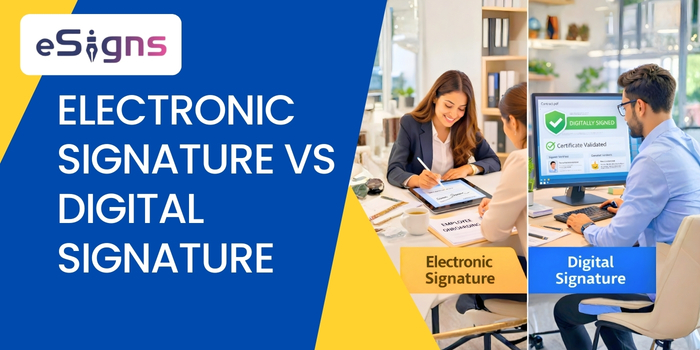
In today’s modern, paperless workflows, businesses are increasingly interested in digital and electronic signatures to streamline approvals. Wondering what and how they work in industries? Let’s discuss the key difference between electronic signature and digital signature below.
Due to heavy documentation and workload, businesses are switching to electronic document management systems like eSigns.io. Embracing digital signatures and eSignatures, organizations can sign and manage documents efficiently.
It replaces handwritten signatures with online signatures. Generally, both digital signatures and eSignatures differ in security, technology, mechanisms, and legality.
Therefore, explore our guide on Electronic Signature vs Digital Signature, which helps everyone to select the right document signing solution.
What Is An Electronic Signature?
An electronic signature (eSignature) is an authentic form of document signing used to approve contracts and agreements digitally. Modern eSignature software enables enterprises to sign documents online and securely streamline document approvals.
Excited to learn how it works, what the benefits are, and how to choose eSign software? Dive in!
How Does Electronic Signature Software Work?
Typically, free eSignature software online works in a few simple steps:
- Firstly, visit the best electronic signature software like eSigns.io
- Upload/create the document.
- Specify the signature fields and add recipient/signer information.
- Set up authentication techniques such as OTP, 2FA, and email verification.
- Share the document for signing via Bulk Send or GetLink.
- Monitors the document status in real-time.
- Recipients can sign documents securely.
- Finally, stores signed documents in a centralized digital repository.
eSigns’ cloud-native free eSignature DMS platform helps businesses eSign documents online and automate workflows for faster approvals.
Why Do Businesses Use eSignatures?
Using eSignatures, businesses can:
- Allow document approvals from anywhere.
- Enhance automated document workflow management.
- Reduce delays and administrative workload.
- Smoothly integrate with existing systems like CRM, HRMS, and ERP.
- Tracks document movement and alerts users with important notifications.
- Get a detailed auditing log of eSignatures.
Hence, various sectors such as staffing, healthcare, education, hospitality, and financial services rely on the online signature software for faster and more efficient document operations.
When To Choose Electronic Signature Software?
Choosing the best electronic signature software is worthwhile when you:
- Prefer workflow automation and accuracy in documentation.
- Need to sign voluminous documents.
- Don’t require any cryptographic validation of documents.
- Want real-time approvals for remote teams.
- Require integration with your existing systems.
What Security & Compliance Features Do eSignatures Follow?
Overall, the leading electronic document management system providers offer a range of basic to advanced security and compliance features, including online signatures.
However, eSigns smart eSignature software follows:
- One-time password,
- Two-factor authentication,
- AES encryption,
- IP tracking,
- Role-based access controls,
- Timestamped audit trails, and
- Compliance acts as per company standards.
As a result, eSigns free eSignature software ensures legally binding electronic signatures online while streamlining automated document workflow management.
What Is a Digital Signature?
A digital signature is a secure way to verify a signer’s identity and document integrity. It works using public key infrastructure (PKI) and cryptographic mechanisms, together with a reliable digital certificate.
Usually, digital signatures follow Advanced Electronic Signature (AES) and Qualified Electronic Signature (QES) standards, which comply with strict regulatory frameworks.
What is a Digital Certificate?
A Digital Certificate is an electronic authority provided by a trusted Certificate Authority (CA). It verifies the signer’s identity and approves digital signature verification.
To create and verify secure digital signatures, all you need is a valid digital certificate. However, it includes important data such as:
- Public key
- Signer identity
- Certificate authority info
- Expiry date
What Are the Types of Digital Certificates?
For signing documents, there are two types of digital signature certificates. They are:
Server-signing certificate: Verifies signer authentication and signs documents digitally with the eSignature vendor’s trusted certificate.
Local-signing certificate: The signer’s identity is connected to a personal certificate. It gets kept locally on a PIN-protected smart card, computer, or USB token.
These digital certificates and secure digital signature software for MSMEs, enterprises, and regulated sectors allow them to sign contracts online.
Digital Signature Application Level
Generally, electronic signature software operates the digital signatures at two levels:
- Signature Level – Control tampering with the signature itself.
- Document Level – Prevent tampering risks with the data and ensure document integrity.
When to Choose Digital Signature Software?
The digital signature software is required when you think:
- Documents involve taxation, tenders, or financial compliance
- Legal or government compliance is compulsory.
- Requirement of strong encryption-based verification.
- Legal requirements need digital signature validation.
Which Compliance & Security Features Does Digital Signature Software Use?
Digital signature software uses security & compliance features such as:
- Certificate Authority validation,
- Public Key Infrastructure (PKI),
- Hash encryption algorithms,
- Tamper detection,
- Time stamping, and
- Regulatory compliance frameworks.
Hence, this digital signing is preferred for government filings, banking, and statutory documentation.
Electronic Signature vs Digital Signature
Wondering when, where, and which type of digital signing technique suits your business? Not anymore! Here are a few common examples/use cases of electronic signature vs digital signature.
E-Signature Examples/Use Cases
- Sign employee onboarding forms or vendor contracts online with eSignatures
- Approve legal agreements with eSignature for financial services
- Signing check-in and check-out online using electronic signature software for hospitality.
- Electronically signing patient consent forms and medical records via eSign healthcare document management software.
Overall, eSigns electronic document management system automates workflows. Also, allows the staffing, hospitality, finance, and healthcare industries to sign documents online with strong security.
Examples/Use Cases of Digital Signature
- Staffing compliance forms can be securely signed using digital signature software.
- Government-related contracts, tenders, permits, and certificates get verified and tampered with digital signatures.
- Banking documents rely on highly secure digital signature platforms to sign documents online.
- Using digital signature software for MSMEs helps sign agreements globally while securing sensitive data.
Key Differences Between Electronic Signature and Digital Signature
Here, you can check out the main differences between eSignatures and digital signatures in all aspects, right from definition to user experience.
Electronic Signature (eSignature)
- A digital version of signing documents with strong validity.
- Uses cryptographic techniques. Including typing a name, clicking “I Agree,” drawing, uploading, and secure signing like digital signatures.
- Provides strong authentication via email verification, 2FA, IP tracking, audit trails, and more.
- It depends on the selected e-signing method, from basic to advanced.
- Legally valid in the US, EU, India, and other regions too. Follows eSign and local compliance standards with the legality of electronic signatures.
- Advanced security detects the tampering and invalidates the signature.
- Easy to use and implement with minimal setup.
- Day-to-day business documents to highly confidential documents are considered.
- Highly flexible and quick with secure digital signing workflows.
- Simple, handy, and intuitive for individuals and companies.
Digital Signature
- A secure, certificate-based electronic signing method that uses cryptographic technology.
- Uses cryptographic techniques (PKI), hashing, and digital certificates issued by a Certificate Authority (CA).
- Robust verification using encrypted private and public keys linked to a verified digital identity.
- Secure and tamper-proof for every document.
- Highly enforceable and compliant with strict regulatory and legal standards.
- Documents altered after signing lead to invalid signatures automatically.
- Needs digital certificates, infrastructure, and identity verification processes for implementation.
- Highly confidential and compliance-heavy documents like financial contracts, legal agreements, and government submissions.
- Less flexible but more secure with strong compliance acts.
- More technical and process-driven.
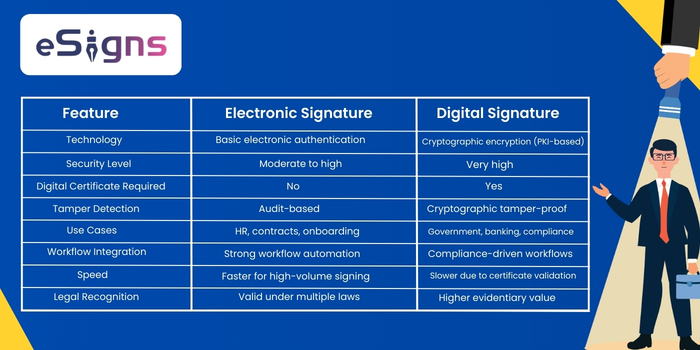
Comparison Table of Electronic Signature Vs Digital Signature
Check out the table below:
Conclusion
Overall, picking the best document signing approach depends on your business requirements and operational goals. Hence, both digital and electronic signature software are best suited to modern digital workflow management.
eSigns new blog on Electronic Signature Vs Digital Signature helps industries choose the best eSign software application to streamline approvals with legally valid document signing.
For more eSignature process and benefits, stay connected with our blog page regularly, or visit eSigns.io for a quick free demo.
FAQs
- What is the difference between a digital signature and an electronic signature?
A. A digital signature uses cryptographic encryption and a digital certificate mechanism to verify the signer’s identity and ensure document integrity, whereas an electronic signature helps industries sign files electronically.
2. Are digital signatures more secure than electronic signatures?
A. Yes. Digital signatures use certification-based verification and encryption features to offer secure and tamper-proof document signing than eSignatures.
3. Can I use free electronic signature online software for legal documents?
A. Yes, eSigns free eSignature online platform complies and provides detailed audit trails. Hence, legal documents with fewer risk factors can use the electronic signature software.
4. Do I need a digital signature certificate?
A. Yes, you require a digital certificate when you follow the regulatory frameworks with cryptographic validation.
5. Can eSigns electronic signatures support OTP & 2FA?
A. Yes. eSigns modern electronic signature software supports OTP verification, two-factor authentication, role-based access controls, and other encrypted validations.
6. What is the best electronic signature software for businesses?
A. The best eSignature software for businesses is eSigns. It offers document workflow automation with an integrated free electronic signature tool that helps businesses create, share, manage, and sign documents online.